
1. Problem Context and Objectives
1.1 Situation
As part of building a personal cloud security portfolio, a brand‑new AWS account was treated as a greenfield environment that needed to be secured before any serious workloads were deployed. The goal was to avoid the common pattern of “build first, secure later” and instead embed security controls from day one.
Three risks were in scope: over‑powered root credentials, undetected cost abuse (e.g., crypto‑mining), and lack of audit visibility.
1.2 Objectives
The case study had three concrete security objectives:
-
Protect the root account and move daily administration to a safer, trackable IAM identity.
-
Configure billing alerts so unexpected spend would be surfaced early.
-
Enable and validate audit logging with AWS CloudTrail for all regions.
Success criteria were: root no longer usable without MFA, at least one working budget alert, and CloudTrail showing key activities (login, user creation) in logs.
2. Root Account Hardening
2.1 Actions Taken
The first step was to harden the AWS root user, which has unrestricted privileges and represents the single largest account‑level risk.
Key actions:
-
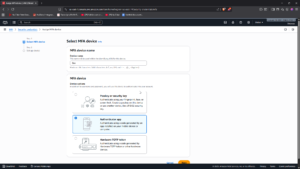
Enabled MFA on root
-
A virtual MFA device (authenticator app) was registered and enforced for all root sign‑ins.Root can no longer sign in with only a password.
-
-
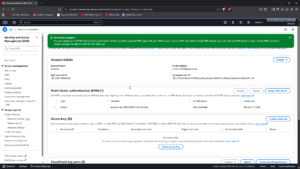
Removed root access keys
-
The Security Credentials page was checked for existing access keys.
-
Any present keys were deactivated and deleted; no new root keys were created.
-
-
Created a dedicated admin IAM user
-
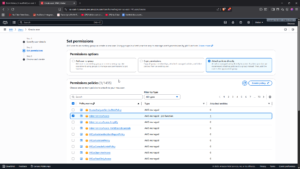
An IAM user, Zee was created and given
AdministratorAccessfor convenience, with the intention to later refine to least‑privilege roles. -
Console access was enabled with a strong password, and MFA was enforced on this account as well.
-
-
Defined a root usage policy
A simple operational policy was documented for the portfolio:
-
Root is used only for account‑level operations (e.g., billing details, support, domain‑wide settings).
-
All day‑to‑day administration, demos, and labs are done with IAM users/roles.
2.2 Result
After this stage:
-
The root account can only be used with MFA and has no programmatic keys.
-
Daily work happens under an auditable IAM identity, aligning with least‑privilege and separation of duties.
3. Cost Protection via Billing Alerts
3.1 Budget and Alert Configuration
To detect misuse or misconfiguration early, an AWS Budget was created to watch monthly costs and send alerts via email once thresholds were crossed
Steps:
-
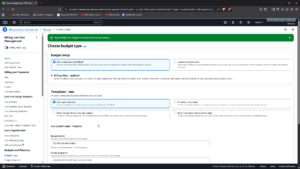
Navigated to Billing & Cost Management → Budgets and created a Monthly Cost Budget. Scope was set to all services in the account.
-
A conservative budget limit (e.g., USD 10) was chosen to ensure alerts would trigger during small experiments.
-
Two alerts were configured:
-
At 50% of forecasted spend.
-
At 100% of actual spend crossing the budget.
Notifications were sent to a monitored email.
-
3.2 Rationale and Impact
Unexpected billing spikes are often the first visible signal of attack or misconfiguration (e.g., crypto‑mining workloads, accidentally over‑provisioned instances).
With the budget and alerts in place, the account now provides early warning on:
-
Unauthorized resource creation.
-
Runaway services or misconfigured tests.
This supports both cost control and security detection from day one.
4. Audit Logging with AWS CloudTrail
4.1 CloudTrail Configuration
The final control was to ensure that all high‑value actions in the account are logged, centrally stored, and reviewable.
Configuration steps:
-
Trail scope
-
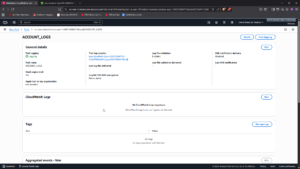
A new CloudTrail trail was created and set to apply to all regions, to avoid blind spots when services are created outside the primary region.
-
-
Event types
-
Management events were enabled for Read and Write operations.
-
Where available, data events were considered for critical services.
-
-
Log destination
-
An S3 bucket was created with versioning enabled and public access blocked.
-
CloudTrail was configured to deliver logs to this bucket.
-
-
Basic S3 hardening for logs
-
The log bucket was configured with:
-
Block public access.
-
Versioning on (to preserve log history and support tamper detection).
-
-
4.2 Verifying Audit Coverage
To confirm that the setup actually recorded activity:
-
Logged in as the IAM admin user and performed actions such as:
-
Viewed IAM users.
-
Created and deleted a small test IAM user.Then opened CloudTrail → Event history and filtered by
eventName = ConsoleLogin,CreateUser, andDeleteUser.
-
-
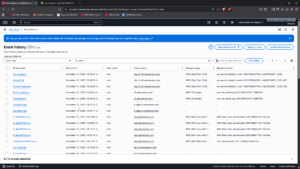
This confirmed:
-
Successful logins and IAM changes were captured with identity, time, source IP, and action details.
-
A reliable audit trail now exists for future labs and for any real workloads added later.
5. Observations and Lessons Learned
5.1 What Worked Well
-
Small, focused controls have huge impact
Enabling MFA, disabling root keys, and adding one budget alert and one CloudTrail trail already transform a default account into something closer to production‑ready. -
Security and cost are linked
The budget alerts serve double duty as both financial and security detection controls.
5.2 Trade‑offs and Limitations
-
The admin IAM user was given
AdministratorAccessto keep the initial setup simple; in a real organization, this would be replaced with task‑specific roles and just‑in‑time elevation. -
Only core billing and CloudTrail controls were implemented; additional tooling (Config rules, GuardDuty, CSPM) would further strengthen posture.
6. Recommendations and Next Steps
For a real production account or a more advanced portfolio iteration, the following enhancements are recommended:Introduce least‑privilege admin roles
-
-
Replace a single broad admin policy with function‑specific roles (e.g., network admin, IAM admin, billing viewer).
-
-
Add security‑focused alerts
-
Build CloudWatch/CloudTrail‑based alerts for root login, IAM policy changes, and public S3 bucket changes (as explored in Lab 6).
-
-
Enable organization‑wide guardrails
-
Use AWS Organizations, SCPs, and Config rules to standardize root protection, logging, and cost controls across multiple accounts.
-
-
Regular audits
-
Periodically review CloudTrail logs and billing reports to ensure controls remain effective and to catch drift over time.
-
7. Summary
This case study demonstrates how a completely new AWS account was hardened into a secure foundation suitable for future workloads and teaching demonstrations. By focusing on root protection, billing alerts, and CloudTrail logging, the environment now embodies key principles of least privilege, early detection, and auditability from day zero, rather than as an afterthought.
The same pattern can be reused for any new cloud account as a repeatable onboarding baseline in a larger multi‑account strategy.